Mermaid Sequence Diagram Branches: alt, else, opt, and loop
Use alt and else to show success and failure responses to a request. Nest opt in the successful branch when an extra step is possible only after success, and wrap the request in loop to show a bounded retry.
Retry a report request
This client requests a report. A temporary service failure asks it to retry; a successful response can optionally lead to a CSV download:
sequenceDiagram
  participant Client
  participant API
  participant Worker
  loop Retry up to 3 times, stop on 200
    Client->>API: GET /reports/42
    API->>Worker: Check report status
    alt Report available
      Worker-->>API: Ready
      API-->>Client: 200 OK (report)
      opt Download CSV
        Client->>API: GET /reports/42.csv
        API-->>Client: 200 OK (CSV)
      end
    else Temporary failure
      Worker-->>API: Unavailable
      API-->>Client: 503 Service Unavailable (Retry-After)
    end
  end
Edit this report-retry diagram in the Mermaid playground
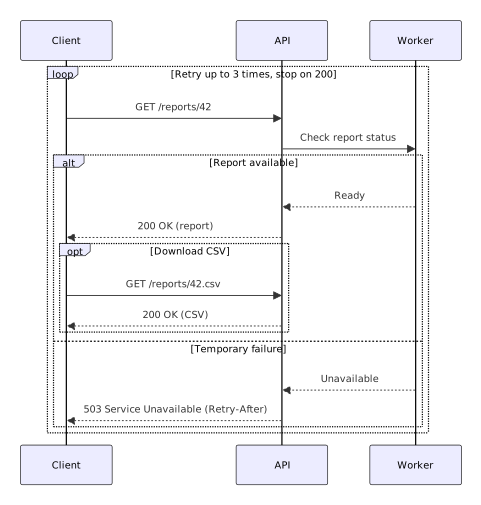
The alt block draws mutually exclusive Report available and Temporary failure paths. else starts the failure path, and the first end after the CSV response closes opt; the next closes alt; the last closes loop. Nesting the optional download under Report available keeps it off the failure path.
loop labels the repeated interaction, but Mermaid does not run requests, count attempts, or stop on a 200 response. Your client must implement the three-attempt limit and the stop condition. Similarly, alt shows possible outcomes; it does not inspect the worker's response. The 503 Service Unavailable response includes a Retry-After header in this scenario, but Mermaid does not schedule the next attempt.
For the basic participant and arrow syntax before adding branches, see how to create a Mermaid sequence diagram. For a compact syntax reference, see the Mermaid cheatsheet.
Reference: Mermaid sequence diagram syntax.