How to Connect Graphviz Edges to Node Sides and Table Ports
Use node:e or node:w to connect an edge at a node's east or west side. For a specific cell in an HTML-like table label, give its <TD> a PORT name and write node:port:compass at that end of the edge.
Attach edges to box sides
digraph Ports {
  graph [rankdir=LR];
  node [shape=box];
  client:e -> api:w [label="request"];
  api:e -> store:w [label="write"];
}
Run the side-port example in the Graphviz editor

In client:e -> api:w, client:e chooses the tail on Client's right side and api:w chooses the head on API's left side. The second edge starts at api:e and ends at store:w. Those e and w suffixes are compass points, not extra nodes.
Point from a foreign-key cell to a primary-key cell
In this two-table diagram, PORT="customer_id" names a cell in Orders and PORT="id" names a cell in Customers:
digraph Schema {
  graph [rankdir=LR, ranksep=1.1];
  node [shape=plain];
  orders [label=<
    <TABLE BORDER="1" CELLBORDER="1" CELLSPACING="0" CELLPADDING="6">
      <TR><TD WIDTH="160"><B>orders</B></TD></TR>
      <TR><TD PORT="id">id (PK)</TD></TR>
      <TR><TD PORT="customer_id">customer_id (FK)</TD></TR>
    </TABLE>
  >];
  customers [label=<
    <TABLE BORDER="1" CELLBORDER="1" CELLSPACING="0" CELLPADDING="6">
      <TR><TD WIDTH="160"><B>customers</B></TD></TR>
      <TR><TD PORT="id">id (PK)</TD></TR>
      <TR><TD>email</TD></TR>
    </TABLE>
  >];
  orders:customer_id:e -> customers:id:w [label="references"];
}
Run the two-table port example in the Graphviz editor
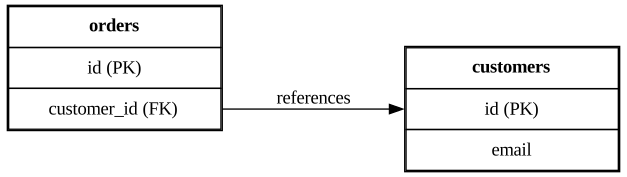
The edge syntax is orders:customer_id:e -> customers:id:w: customer_id and id select the cells; e and w select their sides. PORT belongs on each <TD> inside the table label. The two tables can both have an id cell because a port is scoped to its node. If you omit a port or misspell its name, Graphviz may attach the edge to the node instead; inspect the rendered arrow rather than relying on parser success.
These examples render with this site's Graphviz 9.0.0 dot engine. Ports choose attachment points; they do not prescribe the entire edge route or guarantee the same layout in another engine. For text inside nodes, see multiline Graphviz labels rather than putting multiline text into a port name. For edges that attach to cluster boundaries instead of cells, see connecting Graphviz clusters; the Graphviz cheatsheet covers general DOT syntax.
Reference: Graphviz port positions and HTML-like labels.